JSM allows you to write mods for the first version of Minecraft in JavaScript (not Java!)
JSM adds APIs for player and level mutation, registering custom blocks, HUD rendering, keybinds, and event
hooks. Just drop the .js into the mods/ folder!
Look how easy it is to make a mod!
var $ = {
getModDetails: () => ({
name: "My First Mod",
description: "I made this!",
authors: ["numenmc"]
}),
getModNamespace: () =>"mymod",
start: () => {
Game.registerBlock({
texture: ...,
name: "My Custom Block",
identifier: "custom_block"
});
}
}
Here, we've made a custom block called "My Custom Block."
The whole mod goes in the $ variable.
We can include information about the mod by returning a ModDetails
which the mod loader can interpret.
We can define a block by giving it properties then using Game.registerBlock to add it to the game.
Download the .zip file by clicking the "Download latest" button above.
3.
Create a new instance in Prism or MultiMC and set the version to rd-132211
4.
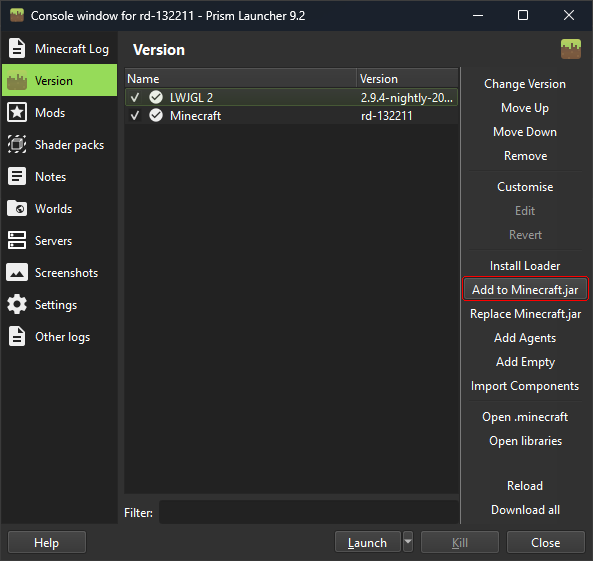
Edit the instance and click the "Version" tab. Then click "Add to Minecraft.jar" and select the
.zip you just downloaded.
5.
If the instance fails to launch go to the "Settings" tab and turn on "Skip Java compatability
tests."
6.
You can now place mod .js files into the mods/ folder
Core mods
These mods are written by me, they provide useful features you would otherwise have to write yourself.
Mod description
Download
Hotbar - this mod adds a hotbar that you can scroll with the Q and E keys. If you do not want
to use this mod,
you can select the block to place by using the Game API.